
Progress invoicing: partial and final invoices from one estimate
Progress invoicing in QuickBilling turns one accepted estimate into as many partial invoices as you need, then one final invoice that deducts them and shows the remaining amount. The estimate keeps count of what is invoiced and what is left. It is built for freelancers, agencies and small trades who bill a project in stages.
How to convert an estimate to multiple invoices
Take an accepted estimate for 10,000, in any currency.
Choose "Bill in parts".
It is in the estimate's "More actions" menu. Enter how much to bill now, as a percentage or an amount, and three lines update: estimate total, already invoiced, this invoice. You cannot go over what remains.
Create the partial invoice.
Enter 30% and you get a draft for 3,000. It opens in the usual editor, linked back to the estimate, and you send it, record payment and remind as for any invoice.
Bill again, then finish.
At the next stage, bill 20% (2,000). When the work is done, choose "Create final invoice" for the remaining 5,000.
After the first partial invoice, the estimate shows an "Invoicing" block: invoiced, remaining, paid so far, and the linked invoices with their status.
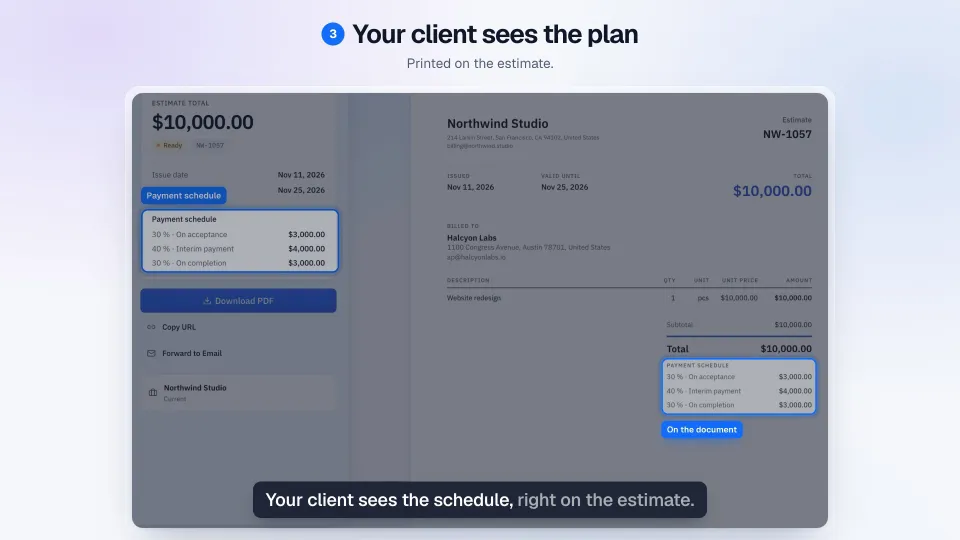
You can also plan the parts up front: add a payment schedule to the estimate, for example 30 / 40 / 30. Your client sees it on the estimate, and each planned part becomes a partial invoice in one click.
What the final invoice shows
The final invoice carries the estimate's full items, so the client sees the whole job. Below them it lists each earlier partial invoice with its number, date and amount, deducts them, and shows the amount due. In the example: 10,000 for the job, less partial invoice 1 (3,000), less partial invoice 2 (2,000), amount due 5,000.
The layout is the same in the PDF, share link, client portal and emails.
Partial invoice, deposit, stage payment: the words
- Deposit: paid before work starts and deducted at the end; here, simply the first partial invoice.
- Partial invoice: one slice of the job, billed as you go. Also called a progress invoice, and in the UK an interim invoice or stage payment.
- Retainer: an ongoing fee or a prepaid balance drawn down over time. Partial invoices are not built for it.
Australian builders call a similar document a progress claim.
How much to ask upfront: Should Freelancers Charge a Deposit? When 25 to 50% Upfront Makes Sense.
What stays the same when you use progress invoicing
"Convert to Invoice" still makes one invoice in one click, in the same place. If you never use "Bill in parts", nothing in your estimates or invoice lists changes. Partial and final invoices are ordinary invoices: they take numbers from your usual sequence, start from the estimate's customer, currency, template and payment terms, and appear in your reports.
Questions
How do I create a deposit invoice from an estimate?
Open the accepted estimate, choose "Bill in parts" and enter the deposit as a percentage or an amount. The default title is "Partial invoice"; you can change it on the invoice to "Deposit invoice" or "Progress invoice".
How do I show the deposit already paid on the final invoice?
You don't type it in. "Create final invoice" lists and deducts every earlier partial invoice and shows the remaining amount due.
Can I bill a fixed amount instead of a percentage?
Yes. Either way, a partial invoice can never be more than what remains on the estimate.
What if I change the estimate after the first partial invoice?
Its items, discount, tax and currency are locked so the total cannot shift. They unlock once every linked invoice is deleted or voided.
Can I create the final invoice while a partial invoice is still a draft?
No. Send or delete the draft first; the message tells you which one. Using "Convert to Invoice" on an estimate that already has partial invoices creates the final invoice.
Does it create e-invoices?
No. QuickBilling creates PDF and share-link invoices, not e-invoice formats such as XRechnung, ZUGFeRD or Factur-X.
Does a stage payment invoice meet the rules in my country?
QuickBilling makes no claim that it does. In the UK, for example, HMRC's VAT guide says most deposits create a tax point when you receive them (VAT Notice 700, para 14.2.3, GOV.UK, updated 25 June 2026). Ask your accountant or tax adviser how to treat yours.
What it does not do
- It starts from an estimate; an invoice with no estimate behind it cannot be billed in parts.
- It does not create partial invoices on dates or milestones by itself.
- It does not collect deposits by card or online.
- It does not handle retainers, retention or holdback, or progress claims under construction payment law.
- It does not create e-invoices, give tax advice or check invoices against any country's rules.
Bill the first part of your next estimate.
Start free