
Recurring invoice software you review first
Recurring invoice and billing automation software that prepares every invoice on schedule as a draft for you to review and send, and keeps your real numbers in one ledger.
No credit card required.
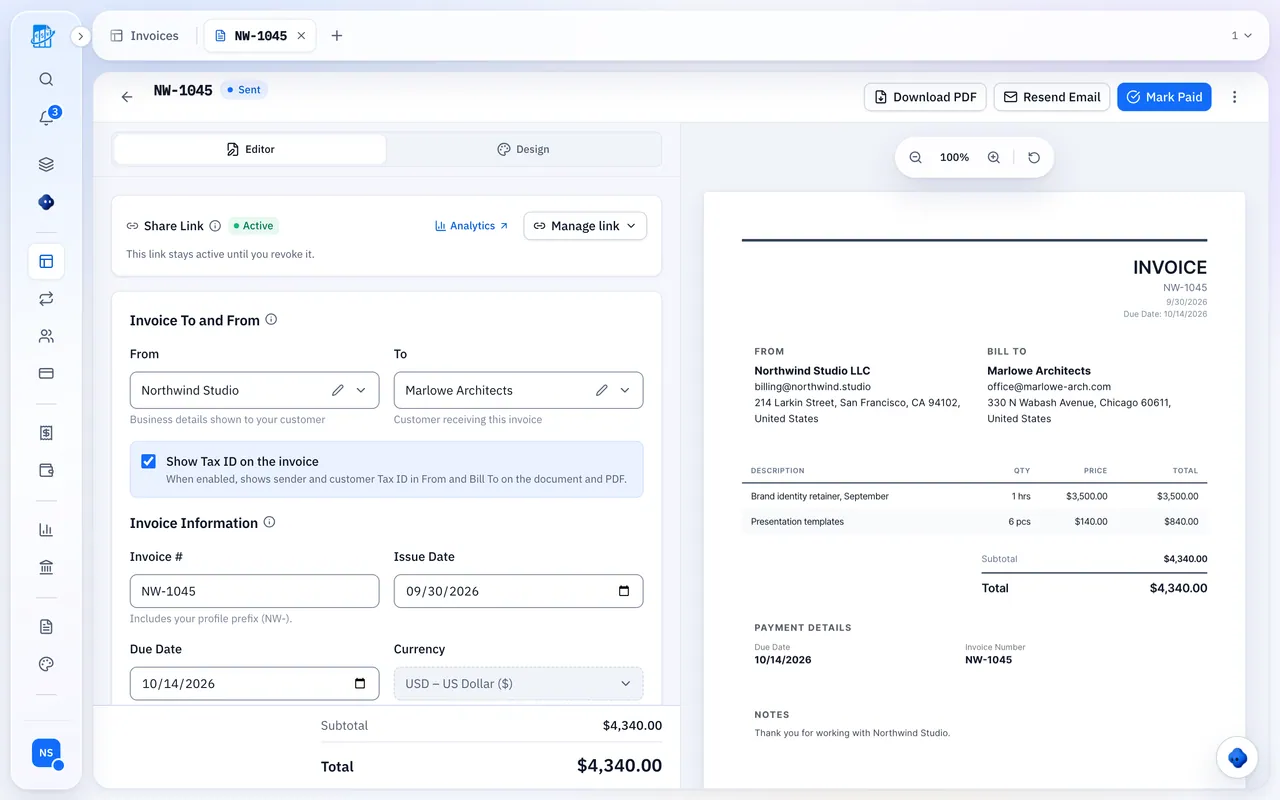
You are not billing clients. You are re-typing last month.
Open last month's invoice. Duplicate it. Fix the date. Change one line. Send. Forget. Remember three weeks later that nobody paid, then write an email that makes you sound like you need the money.
Multiply that by every client, every month, forever.
That is not billing. It is a recurring tax on your own time, paid in the exact hours you could have billed to someone else. A recurring schedule ends it. QuickBilling ends it in one ledger, so money in and money out finally sit together and a client's real margin stops being a guess.
What changes the day you turn on a schedule
Your invoices are ready when you are
Weekly, monthly, quarterly or yearly, every 1 or more periods, so every two weeks is just weekly, every 2. Start when you want, stop on a date, after a set number of invoices, or never. Pause a client mid-contract and pick right back up. Every run prepares a draft for you to review and send, so you will not open a duplicate button again.
Your template stays right, permanently
Each run copies your source invoice: line items, taxes, currency, terms, language and template. Edit the source invoice and the next draft already knows. Invoices your clients have received never change behind their back, so your records stay clean.
Your follow-ups are ready when you send
Reminders are offered, ticked, when you send each draft: an email to your client the day before the due date and one two days after. You can untick them, so nothing goes out that you did not see first.
You stop guessing and start knowing
Share or email an invoice from a schedule and it gets a secure link with a PDF, and you see when it is opened. On paid plans you also see where and on what device. Opened and unpaid is a payment conversation. Never opened is an inbox problem. Now you know which one you have.
How It Works
Setting up your first recurring invoice
Build it once
Client, line items, currency, tax, terms.
Set the rhythm
Weekly, monthly, quarterly or yearly, every so many periods, and when it ends.
Review and send
QuickBilling prepares each invoice on schedule as a draft. You review it, send it, and see when it is opened.
Subscription invoicing that fits your billing
Flat retainers. Memberships that renew on the dot. Support contracts. Recurring fees of any size. Each run copies the invoice you set up, with the same tax treatment every cycle, so your revenue numbers never quietly drift out of true.
Bill in any of 41 currencies, with a workspace default and per-invoice overrides. Send in English, German, French, or Spanish so your client reads terms in their own language and has one less reason to delay. Running several businesses? Unlimited gives each one its own workspace with its own schedules, numbering, and branding under one login.
Expenses and Real Numbers
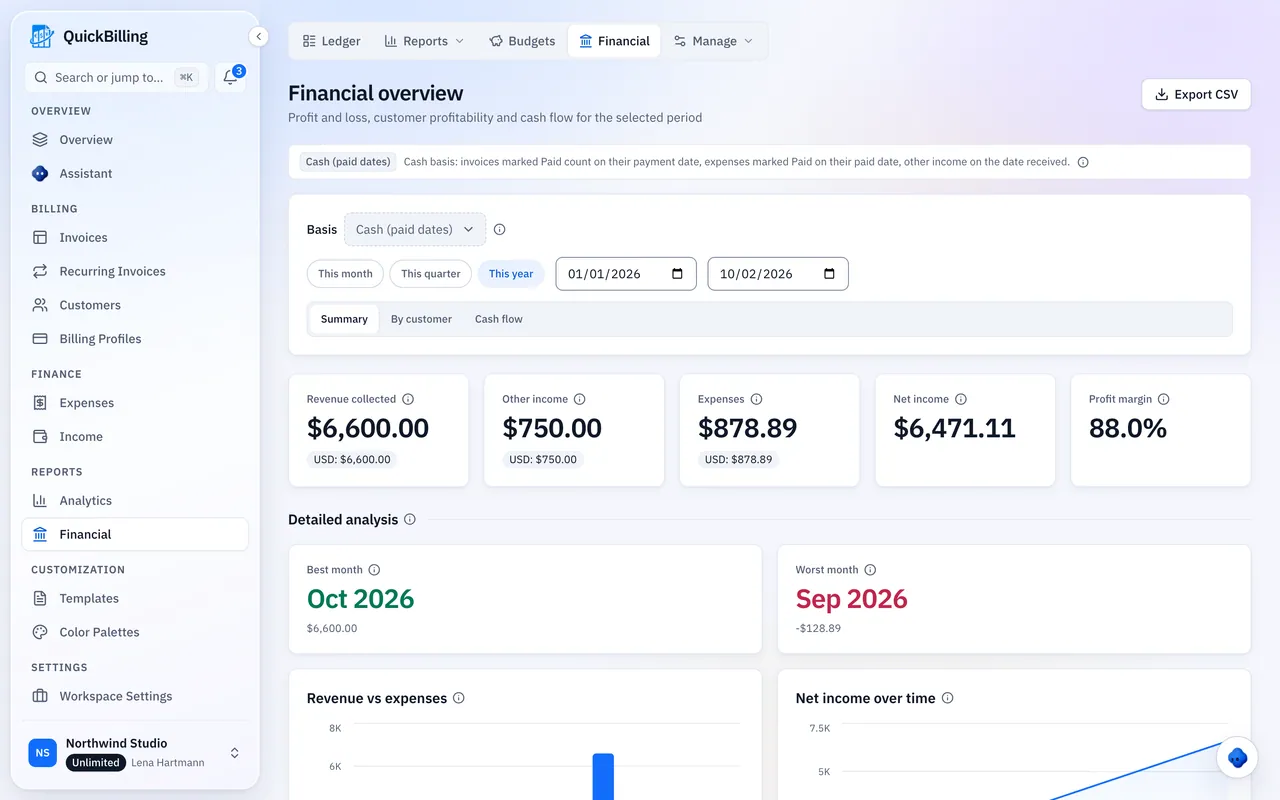
Your invoices and expenses in one ledger
Invoicing software tells you what you billed. That is the flattering half of the story. QuickBilling records invoices and captured expenses in the same ledger, categorized and dated, so every generated invoice and every recurring cost lands in the same cash flow and profit and loss. Profit and loss becomes something you read in a second, not something you rebuild in a spreadsheet at quarter-end and half-year-end.
Developer API and MCP
Automation that goes deeper than the invoice
- Built on a documented REST API
- Create a schedule the second a customer signs up in your product. Pause it when a plan lapses. Update the amount when a contract changes. Documented endpoints, machine-readable OpenAPI spec, no human in the loop.
- MCP ready for AI agents
- Point an agent at the MCP server and it can create, review, pause and resume recurring schedules, with the same permissions as you. Most billing tools stop at the invoice. This one plugs into whatever you build next.
Manual vs QuickBilling
| Doing it manually | Doing it with QuickBilling |
|---|---|
| Duplicate last month and hope you caught the changes | The schedule copies your source invoice with the right dates and totals each time |
| Reminders go out when you remember, if you remember | Reminders before and after the due date, ticked when you send and yours to untick |
| An invoice disappears into silence | Link tracking reports open time, plus location and device on Premium and Unlimited |
| Your billing calendar is a spreadsheet you distrust | Every schedule shows its next run, and the invoices it creates share one ledger with your expenses |
| The tool stops at the invoice | REST API and MCP server extend billing into your product and your agents |
Who it is for
Built for people who bill the same clients again and again
Freelancers on retainer
Same scope, same fee, same date. Bill it without spending a thought on it.
Agencies and studios
Fifty clients, fifty templates, four currencies, one dashboard, zero Sunday nights.
Subscription and SaaS teams
Plan-based billing with an API that keeps schedules in step with your product.
Service businesses
Maintenance contracts, memberships, and support plans that come up for billing on schedule, without a reminder in your calendar.
Frequently asked questions
Short answers to what people ask before they start. Something missing? Ask us directly.
What is recurring invoice software?
Recurring invoice software prepares invoices on a schedule instead of on request. You define the invoice and the cadence once, and QuickBilling prepares each invoice as a draft for you to review and send. Reminders are offered, ticked, when you send each invoice, and you can untick them.
How is this different from duplicating an invoice?
Duplicating copies a moment in time and depends on you remembering. A schedule owns the timing and copies your source invoice each time, and every invoice you send from it can have link tracking and optional reminders.
Can I change a schedule after it starts?
Yes. Pause, resume, edit or delete the schedule at any time. Edit the source invoice to change line items, amounts or currency, and the next draft uses the new version. Invoices already created stay untouched.
Does QuickBilling support subscription billing?
Yes. Retainers, memberships and support plans all run as recurring schedules with consistent tax handling. Each invoice is created as a draft for you to send.
What happens when a client does not pay?
If you kept the reminders ticked when you sent the invoice, a reminder goes out two days after the due date, and follow-ups 7 and 14 days after if you added them. Link tracking shows whether the invoice was opened, so you know whether to nudge or escalate.
Is recurring invoicing available on the free plan?
Yes. Recurring invoices are included on every plan, including Free. Start free and set up your schedules, and upgrade only when you need higher limits. No hidden fees, cancel anytime.
Can I automate recurring invoices through an API?
Yes. Every schedule is available through the REST API with documented endpoints and an OpenAPI spec, plus an MCP server for AI agents.
Which currencies and languages are supported?
Invoice in any of 41 currencies, including USD, EUR, GBP and INR. Send in English, German, French, or Spanish.
Your next invoice is already written
QuickBilling prepares it on schedule. You review it and send it.
No credit card required